The Undercut Racing Manager Pitwall and Deck controls
Keyboard, gamepad, and Steam Deck notes for Early Access 0.5.4.
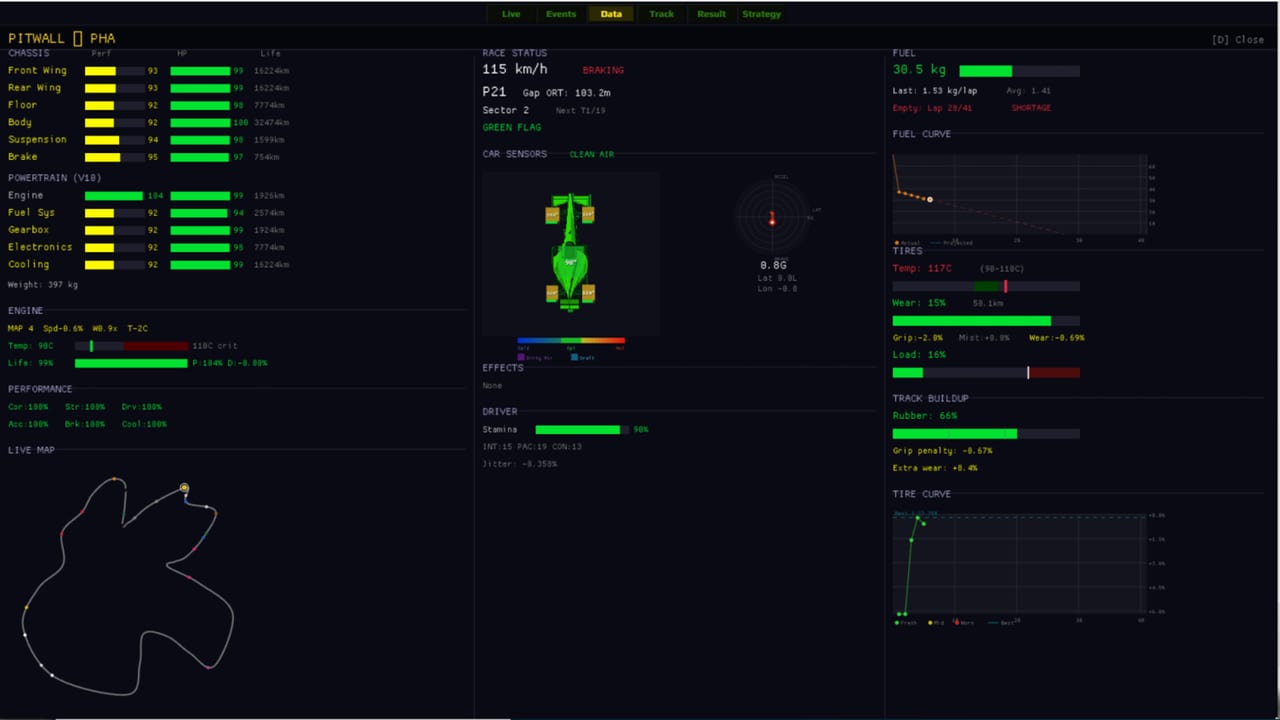
The Undercut is a management sim, not a wheel game. You still need clean bindings, because the live race is a real-time pitwall with clickable towers, speed multipliers, and orders that stick. This page covers how to move around the desktop, how to drive a session, and what 0.5.4 fixed for Steam Deck and high-refresh displays. Pair it with getting started before GP 1 and with race strategy once the lights go out.
Steam lists keyboard-only and mouse-only as supported accessibility options. You can play without timed quick-time events. Saves are allowed at any time. That is the design: pause, think, issue the order, unpause.
Desktop and career navigation
The career hub is a Win95-style desktop. Click icons to open apps. Escape closes the top window. Back now returns to the last opened window instead of dumping you on a random screen. Apps cache so they open quickly; heavy ones show an Opening card while the sidebar stays live.
Useful habits:
- Next GP sits on the taskbar. Mail can block it. Open Mail first.
- Alt+Enter toggles fullscreen from any screen.
- Escape on the main menu asks before quitting. An older bug where Escape then Enter dropped fullscreen instead of quitting is fixed in 0.5.4.
- Closing the window (title-bar X, Alt+F4, Steam Exit) now saves the career. That was a launch-week fix; still keep a manual save before a reckless driver firing.
- Opening Settings from the pause menu no longer silently picks a resolution. The resolution picker itself is patched for high-refresh and high-resolution screens.
Settings tabs cover display, audio, simulation, and career sliders. Units, UI scale, and HUD scale can change without leaving the save. If you raise HUD scale, 0.5.4 shortened the status row so the lap counter no longer hides behind pitwall buttons. Audio sliders apply live from the pause menu. The radio is a short acknowledgement widget, not a long engineer conversation.
On-screen keyboard appears for controller users when a text field needs it. Locked apps explain why they are locked instead of dead-clicking.
Live session pitwall
A practice, qualifying, or race session puts you on the 2D circuit view with a timing tower, minimap, and order bar.
- Speed — 1× through high multipliers, plus pause. Watch GP 1 at 1×. Later, sim at speed and pause for pits.
- Timing tower — click a row to follow that car.
- Pit — commits the selected car to pit at the next chance. Beats the AI plan.
- Stay out — cancels a pending stop while the car is still on track, with a radio call.
- Engine map / cooling / Overtake Push / lift and coast / team orders — toggles on the bar. Overtake Push stays on until you turn it off.
- Start Stint / Hot Laps — qualifying and live practice. Unlimited qualifying stints inside the timer.
- Esc — ends a practice that is still circulating after the flag; that used to run on forever.
Right-click pan is disabled in live sessions so a stray click does not throw the camera. Minimap dots show ranking. Starting-grid cards show pole time and gaps.
If you are hunting hidden traits, stay on the Events feed. Suspected-trait cards pop mid-session; close them and keep the stint going unless you meant to box. That loop is documented in car development.
Gamepad and Steam Deck
The game ships with gamepad support and Steam Deck work in 0.5.4. The important launch fixes:
- The selection ring takes any stick or the D-pad. It used to listen only to the right stick, which the Deck default template treats as a mouse, so infrastructure departments and negotiation buttons could not be selected.
- Tabs step in draw order. Bumpers are no longer reversed.
- Bumpers also raise and lower Work Unit or salary figures in negotiation popups.
- The weekend repair screen accepts Start to continue; it had no controller binding.
- Qualifying run plan scrolls with the triggers, like other screens.
- Linux demo crash on Deck at launch is fixed.
- Podium and country screens fit the display.
If the Deck still feels like a mouse-driven desktop, open the controller layout and make sure a stick or D-pad is bound to the selection ring, not only to a cursor. Then use bumpers for tabs and triggers for lists.
Simulation speed versus attention
You can play the whole championship in Quick Sim once you trust a custom run plan. You can also watch every corner. The controls do not change; your pause discipline does. Pause when:
- a rival pits and you might undercut,
- tyre wear enters the last quarter,
- fuel warning fires,
- a yellow or Safety Car appears,
- a trait or failure card needs a decision.
Do not pause-spam the opening lap unless you enjoy it. The start is chaotic; let the order settle, then manage.
Accessibility and display
Custom volume, stereo, adjustable difficulty via career and simulation sliders, keyboard-only, mouse-only, play at your own pace, save anytime. High-refresh displays are supported in 0.5.4. If a laptop overheats, cap FPS in Settings and prefer Quick Sim for practice. Storage is tiny — under a gigabyte — so the bottleneck is CPU for the sim and your own attention for the pitwall. Full numbers sit on system requirements.
Community language packs and a lang/TEMPLATE.txt editor shipped with launch. Changing language does not require a new career. Six official localizations ship in the box; this wiki covers four of them.
Once the bindings feel invisible, go back to race strategy and issue fewer, better orders. The pitwall rewards a calm hand more than a busy one.
Frequently Asked Questions
Quick answers for pitwall decisions, scouting, and career systems.
Does The Undercut need a racing wheel?
No. You manage from the pitwall with mouse, keyboard, or gamepad. It is a strategy sim with a live 2D race view.
Why can I not select departments on Steam Deck?
0.5.4 lets any stick or the D-pad drive the selection ring. Update the build and bind a stick to that ring instead of only a mouse cursor.
How do I cancel a pit?
Use Stay out while the car is still on track. After it has committed to the lane, you serve the stop. See race strategy.
Will closing the game lose the save?
Not on 0.5.4. Window close, Alt+F4, and Steam Exit save. Manual saves before risky calls are still wise.