The Undercut Racing Manager Facilities are the car
Departments, hidden traits, and Work Units in Early Access 0.5.4.
The Undercut does not hand you a tech tree. The engine arrives from a supplier. Everything else you manufacture, and the ceiling of those parts is the factory you paid for. That is the whole development loop: buy departments in pre-season, spend Work Units during the year, discover hidden traits on track, then decide whether to redesign the sin or live with the character of the machine.
New careers should read getting started before they spend. This page is the factory manual. Pair it with the parts tier list when you are choosing what to Improve first.
Nine departments, not a shopping list
Infrastructure is editable in pre-season and view-only once the season is running. The player cannot rebuild between two races. 0.5.4 also stopped AI teams from shedding or growing facilities mid-season; they invest at rollover like you, with loans and share sales as their in-season levers.
Generic departments run level 1–10. The Driver Academy is a special 0–3 building with its own price curve, covered on the academy page.
- Engineering — a small global weight on every part, the reliability floor, the Repair/Improve Work Unit pool, and repair efficiency. Damage is cheap here and ruinous at level 1.
- R&D — the potential ceiling of every part, design-project Work Units, design quality. It does not add peak pace by itself. It raises the wall Improve can climb.
- Chassis, Handling, Aero, Engine — specialist baselines and improve rates for the parts they own. The Engine department does not make the engine; it owns gearbox, electronics, fuel system, and cooling. The engine part is the supplier’s power unit.
- Marketing — income multiplier, negotiation Work Units, which sponsors you can even see, deal quality, supplier discounts. Often the first upgrade that pays for itself.
- Scouting — observation capacity and passive knowledge. 0.5.4 tripled scouting output per level (45 Work Units per GP at level 1, 180 at level 10). Details in scouting.
Upgrade costs climb steeply. Taking one generic department from 1 to 10 is a season-defining cheque. Running costs print per department, then a global multiplier makes the true total lower than the sum of the rows. Downgrading refunds half a level and cuts upkeep immediately — a survival lever, not an undo button. 0.5.4-1 stopped the old leak: spending no longer leaves the budget when you press +. Nothing is charged until you end the turn, so raising then lowering a level before commit costs nothing. See hotfix notes.
Spend order that does not bankrupt you
A useful first-career order:
- Marketing if you cannot see or close the contracts you need.
- Engineering if repairs are eating the entire Work Unit pool.
- R&D only when fitted parts are already sitting on their potential.
- One specialist — Aero or Handling — instead of sprinkling four departments to level 3.
- Academy only with a healthy war chest. Opening it has a cash gate, not just a price tag.
Parts win the current weekend. Departments win the next pre-season and every one after. That is why dumping the starting budget into Aero before GP 1 is the classic hole listed in getting started.
0.5.4 also fixed a display lie: the weakest factory no longer builds a car that reads as zero, and development room follows the factory instead of rewarding a poor plant with extra headroom. If the car looks slow, believe the factory.
Hidden traits
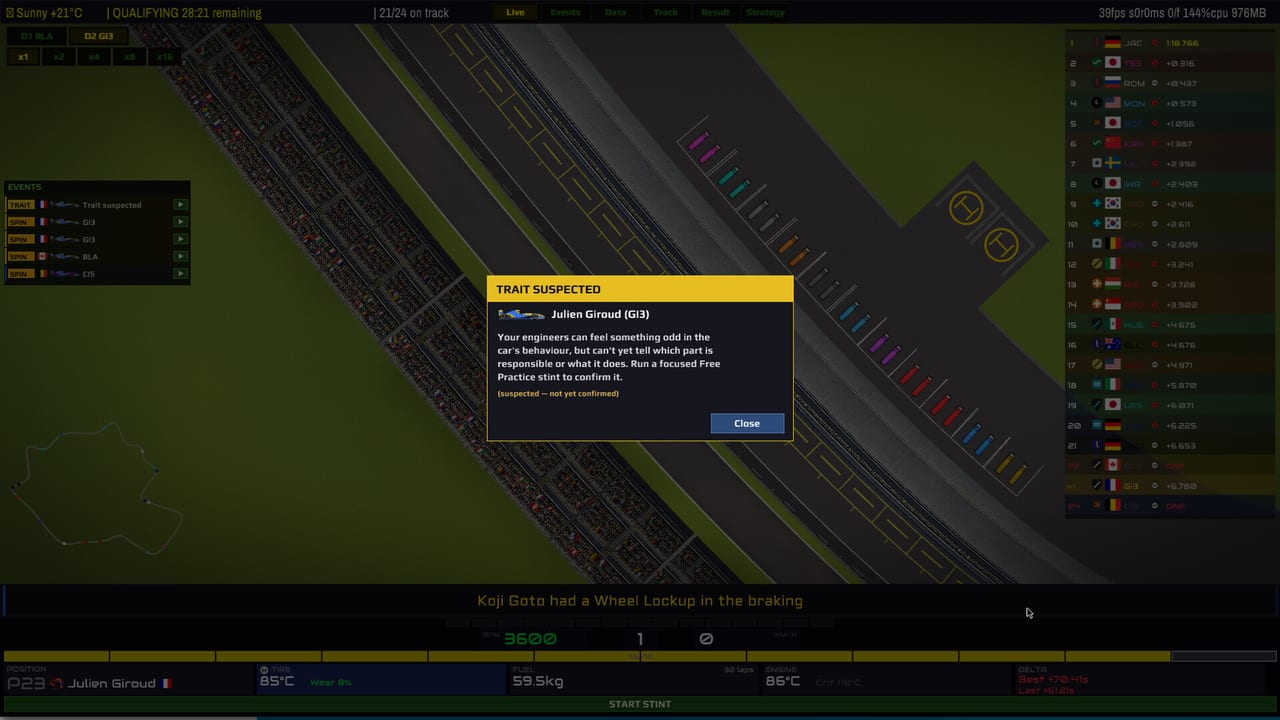
Every component can carry character on top of its numbers: Overweight, Lightweight, Overheating, Low Drag, High Drag, Ground Effect, draft or dirty-air bonuses, brake lockup, gearbox flaws, and more. You do not see them in the shop. You discover them by running the car. Practice is detective work. Qualifying can throw a “trait suspected” card when the engineers feel something odd but cannot name the part yet.
0.5.3 grouped trait investigations by kind with progress gauges and made discovery faster. Only the first practice stint used to count; that bug is gone, so extra stints now buy kilometres. Trait data belongs to the car. Focus a group to advance every part carrying that trait.
When you confirm a negative trait, you either live with it (a High Drag wing on a power circuit is pain; on a street venue you might keep it) or you open R&D Design and spend Work Units on a replacement or a fix. Positive traits are why a “worse” quality roll can still be the car you want. The Car Character panel exists so you can match that personality to the driver in the seat — a forgiving mule for a low-intelligence rookie, a high-ceiling nervous car for a high-intelligence veteran. See driver traits.
R&D tabs
The Car app is several rooms sharing Work Unit pools.
- Inventory — what is fitted, what is on the shelf, wear, whether the car is legal to start. Worn parts now warn before they ruin a weekend.
- Production — the rare tab that spends cash to turn a blueprint into a physical part.
- Repair — Engineering Work Units restore health and as-built performance. Skip cosmetics; fix the part that will DNF you.
- Improve — in-season development toward potential or a reliability ceiling. Stops at the part’s own potential, which is why R&D level matters.
- Design — new parts this season or next year’s regulation car. Work Units, not cash. Several projects can run; focusing one finishes it faster.
- Projects — reallocate, watch, cancel.
- Private Testing — a standing run plan on your development circuit that buys potential and trait knowledge every weekend. 0.5.4 added a tutorial card for this tab.
Weekend loadout is a separate truck: spare cap, remembered selection, and a mule swap that used to destroy the mule. That swap bug is fixed. If your race driver is injured, the reserve or the mule is how you still take the start; injuries last one to five Grands Prix.
Practice programs and the live car
Free practice is not only a setup screen. You can run it live: stints, tyres, fuel, hot laps. Trait investigations and development programs share that time. A focused practice stint is how a suspected trait becomes a named one. Simulated practice in older builds could blame the wrong driver; 0.5.4 fixed that clock and those flags.
On the Data pitwall you will see chassis and powertrain bars, engine map, tyre temp versus the window, fuel kilograms, and dirty-air state. Those bars are the same parts you manufacture. A 93-rated front wing with a hidden High Drag trait will still look fine until the straight-line delta shows up. That is why this page and race strategy are one loop: the factory sets the cliff, the pitwall decides whether to pit before it.
Suppliers versus the shop
You manufacture bodywork. You buy the engine. Tyre and fuel suppliers change wear, heat resistance, and consumption. A beautiful Aero department on a terrible tyre deal still cliffs. Sign suppliers on day one as the first career checklist says, then use Marketing level to see better brands. Works partnerships can lock a supplier; an expired works deal used to block them forever — that is fixed in the launch notes.
Mods can replace parts, teams, and even car sprites. A dropped pack in mods/ no longer silently rewrites every new career, including unmodded ones. That 0.5.4 fix matters if you test community content and then want a vanilla save. Official tools and Discord sit on the links page.
Build the plant you can afford. Discover the car you actually built. Then spend Work Units on the trait that is killing lap time, not the department that looks prestigious. The parts tier list is the short version of that argument.
Frequently Asked Questions
Quick answers for pitwall decisions, scouting, and career systems.
Why does the Engine department not upgrade the engine?
The engine part comes from your supplier. The Engine department owns gearbox, electronics, fuel system, and cooling. Pick the motorist first, then the department.
When should I raise R&D?
When Improve has nowhere to go because parts sit on their potential. Raising the ceiling before you can climb it wastes cash. See the spend order above.
How do I find hidden traits?
Run practice. Focus investigations by trait group. A suspected card means keep going. Design a replacement if the trait is a deal-breaker.
Can I upgrade factories mid-season?
You cannot. The app is view-only in-season. Plan departments in pre-season. 0.5.4 also stops AI teams from rebuilding between races.